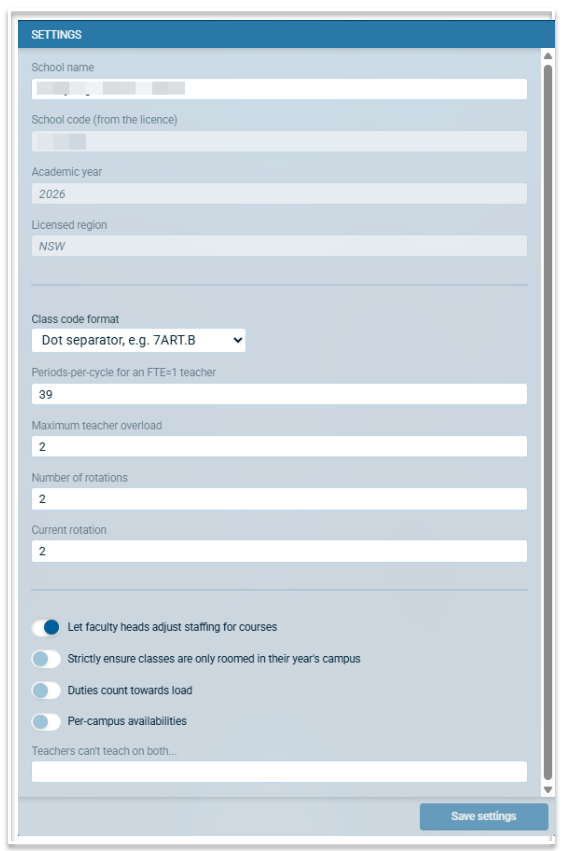
Settings
The Settings modal has specific options related to your file. These are:
School name: This will be the school name created for your licence but can be edited if required.
School code: This is a read only field with your official licence code.
Academic Year: This is a read-only field. Official files are those named for an Academic year (e.g. 2027). New Academic year files are best created using the roll-over function. You can overwrite an official file by using 'File > Save as'.
Licence region: A read-only field from your licence information.
Class code Format: There are four options for class code format available. Select from
a) UK format, e.g. 7B/Ar
b) Dot separator. e.g. 7ART.B
c) Underscore separator. e.g. 7ART_B
d) No separator. e.g. 7ARTB
Periods per cycle for an FTE = 1 teacher: This is a global setting for all teachers on all campuses. Individual values can be modified via the MaxLoad column in the Teachers table.
Maximum teacher overload: This setting is used in the Staffing algorithm to help balance teacher loads and to avoid split classes where possible. The algorithm will assign loads to teachers up to their defined maximum load value but may overload some teachers by the value defined in this setting to create a better staffing balance.
Number of rotations: This is the number of rotations required for the file. This value should match the maximum number of rotations defined in the Structure screen across all year levels or should be a number derived from the combination of rotations used. For example, if there are two rotations in Year 9 and three rotations in Year 7, the number of rotations recorded here would be 6. If this number does not match your structures, you will be notified in Pre Dive checks.
Current rotation: This should be the rotation in place for the current time period. It is used when integrating Atlantis with third party systems.
Let Faculty Heads adjust staffing for courses: This setting must be enabled, in conjunction with the appropriate setup in File > More > Access Schedule, to enable Heads of Faculties to enter their staffing preference or adjust proposed staffing.
Strictly ensure classes are only roomed in their year's campus: Enabling this will ensure that classes are not placed in rooms that belong to another campus when auto-rooming.
Duties count towards load: Enable this if you want duties to be included in a teacher's teaching load.
Per-campus availabilities: For multi-campus schools, enabling this will allow you to set up unavailabilities per campus.
Teachers can't teach on both... Use this to specify two periods, of which a teacher can only be scheduled on one. For example, where a split lunch occurs in either P4 or P5, a teacher can be scheduled in P4 or P5, but not both.
Important: Ensure you click 'Save settings' after making any changes.