Merging Classes
When a class requires cover due to a teacher absence or an event, one of the options that may be available is to merge the class with another. The option to merge a class will be available if there is a class with a size that will accommodate the additional students from the class requiring cover.
To see available classes for merging, click on the class requiring cover to open the selector. If there are classes available that meet the conditions for merging, they will appear at the top of the list, as shown here.
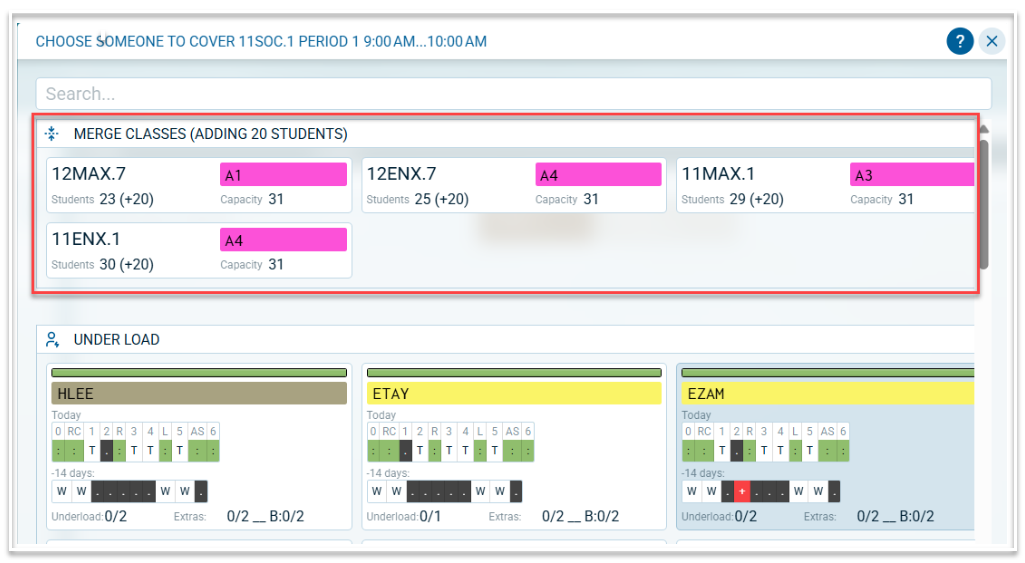
Information displayed includes:
- The number of students from the class requiring cover. This is displayed as (adding x students)
- The name of the class available for merging
- The room in which the available class is scheduled
- The capacity of the room in which the available class is scheduled
- The total number of students that will result from the merge. In the above example, the total number of students that will result from a merge with 11MAX.1 is 29. This is made up of the 9 students in 11MAX.1 plus the 20 students from 11SOC.1
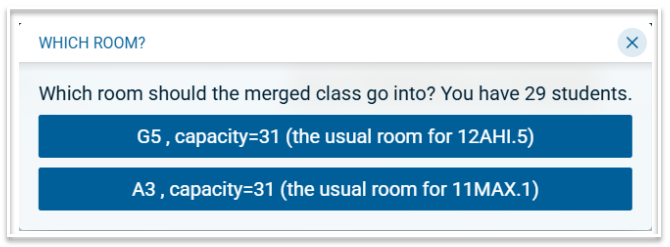
Once a class is selected for merging, there will be an option to select the room for the merged class; the usual room of the class requiring cover or the usual room of the class selected for merging.
Note: When classes are merged, the teacher taking the merged class is not credited with a cover, as they are already teaching in that period.
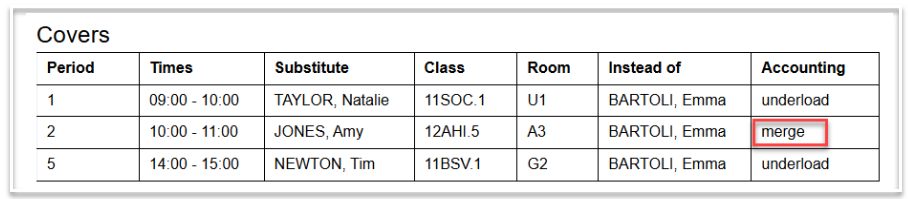
Information regarding merged classes will appear on the Daily Summary as shown below.