
Updating Class Lists from another File
Class lists created and maintained in one file can be copied to another file to keep class lists up-to-date
To update class lists from another file, open the file that needs updating and go to File > More > Import classlists from another file.
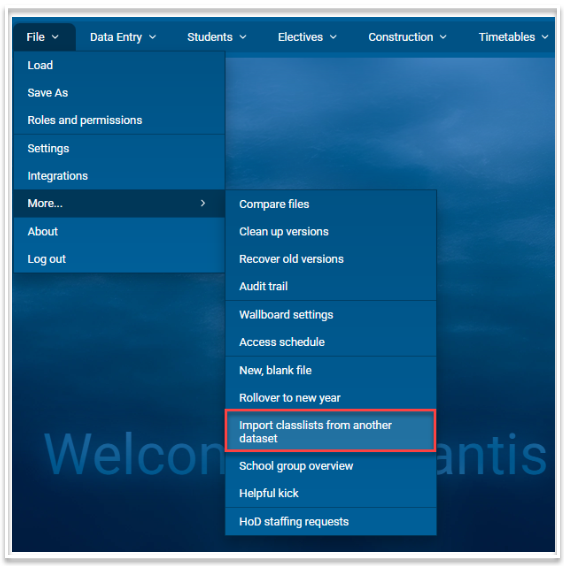
This will open the following dialog:
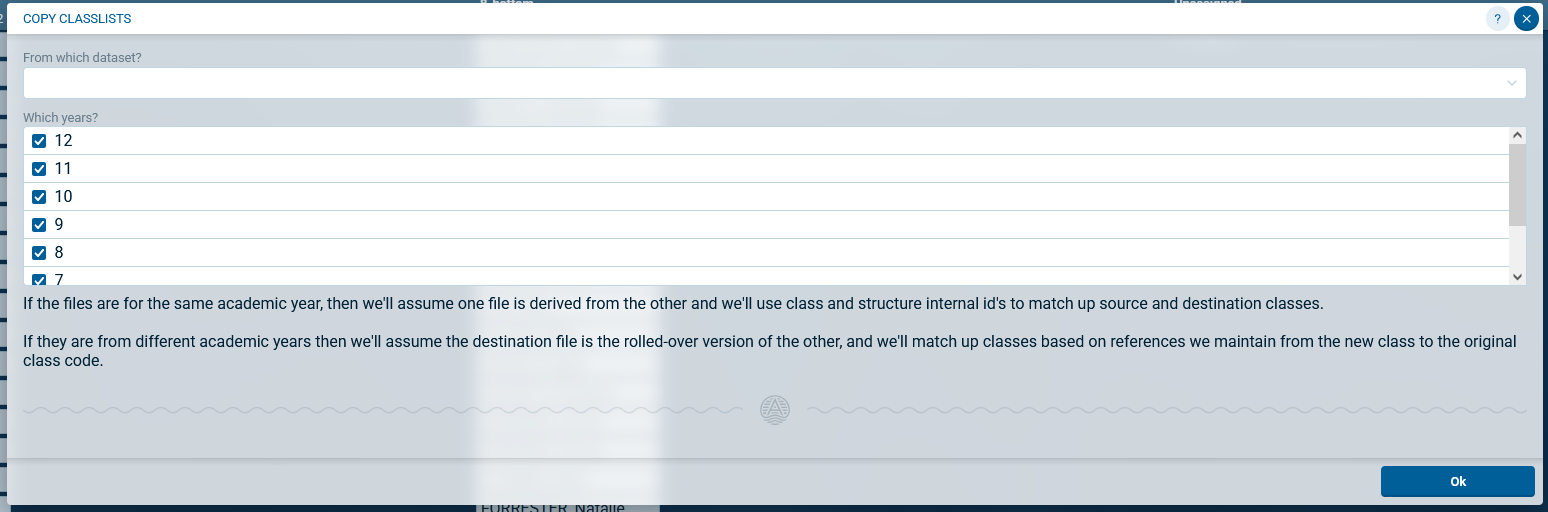
- Select the dataset from which you wish to retrieve the class lists. The dropdown list will include all datasets for your licence. You can use the search function to find the required dataset.
- Select the year level or levels that you wish to import.
- Click Ok.
- All class lists in the selected year level(s) will be updated with the class lists from the selected dataset.
- Students that exist in the source file but not in the destination file will be added to the destination file.
- Class lists can be imported into a rolled over file from the original file. Atlantis internally matches class codes in the rolled over file with those from the original file. For example, to import Year 11 class lists from Term 4 in 2026 into Year 12 in the rolled over 2027 file, select 2026 as the source file and select year 11 in 'Which years?'. This will import those Year 11 class lists into Year 12 class lists in the 2027 file, as well as any new students that were added to the 2026 file after the file was rolled over.