
Part-timer Influences on Elective Lines
This article contains information on how part-time teachers can influence the generation of elective lines
Prior to generating lines, it is recommended that the Courses table is updated with the sets of teachers who are able to teach each course and the sets of rooms in which each course can be taught. Updating teacher unavailability via the Teachers table, if known at the time of generating lines, is also recommended. The Atlantis line generation algorithm will use this information to create lines compatible with student choices as well as timetable resources and limitations.
Part-time teachers
When generating lines, the unavailable days will be displayed for classes which have a part-timer as the only option. When generating under another year level, the fixed year level will display unavailable days for a line. This will help identify impossibilities.
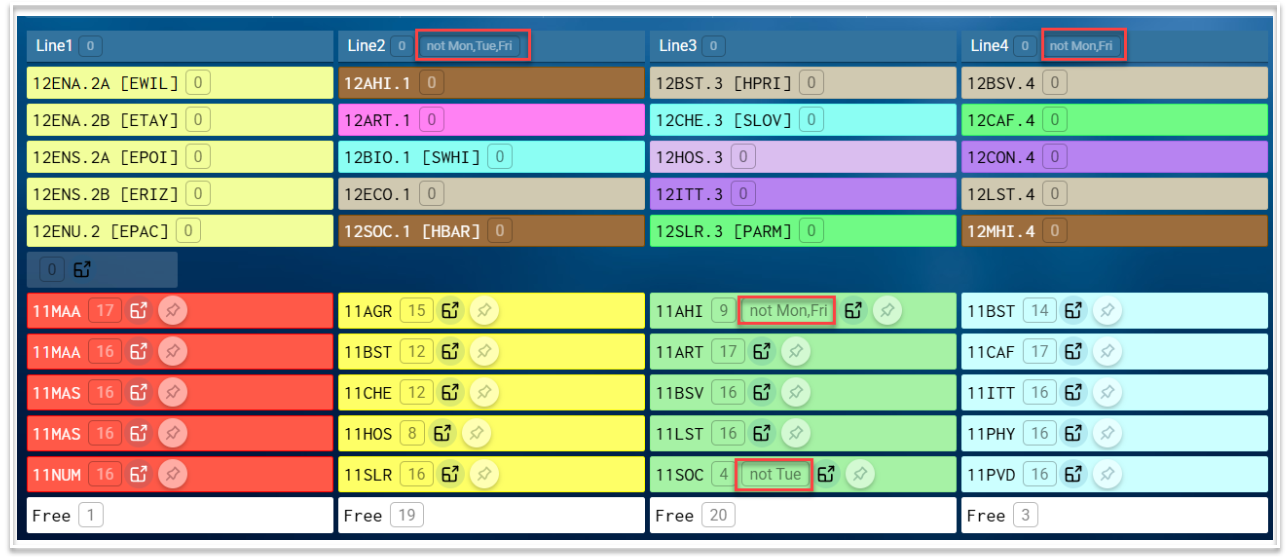
Possible issues with part-timers
- When multiple part-time teachers teach on a particular line, their unavailable days should be compatible. Having part-time teachers in the same line with different days off could result in issues with spreads e.g. the line may only occur on two days of the week and therefore needs more doubles than specified. This would be the case for lines 2 and 3 above which can only run on Wednesdays and Thursdays.
- Having part-time teachers spread across multiple lines could result in undesirable spreads with some lines. For example, if 4 of 6 lines are not able to be scheduled on a particular day, the remaining two lines may need to be scheduled in every period on that day, possibly resulting in double or triple lessons.
- When too many part-timers are placed in one line, splitting classes may be the only option in getting that line on the timetable.
Possible solutions to Part-timer issues
- Allow for Doubles by updating the Spread column against courses with part-timers. Remember, all classes that land in the same line will need the same spread.
- Add more teacher options to the Courses table for courses with part-timers.
- Force classes with part-timers who have the same unavailable days to be on the same line by pinning the classes to a set line or by using the Class relationships table in the Offered Courses screen.
- If you want to split one or more classes with part-time teachers, remove the teacher days off from Teachers table and add them back once the lessons are timetabled with desired spreads.
- Consult with part-time teachers to see if they can change their day off. At this early stage, it may be possible.